
Most of us rely on digital screens throughout the day. Phones, laptops, tablets, TVs, and even smartwatches keep us connected and entertained. Long hours in front of screens can strain the eyes and cause discomfort. This issue is known as Computer Vision Syndrome. You can manage it with awareness, simple habits, and timely care. This blog explains what causes it, common symptoms, practical prevention tips, and when you should consult an eye specialist.
What is Computer Vision Syndrome
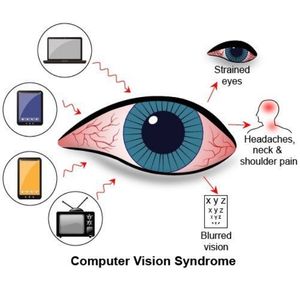
Computer Vision Syndrome, also known as digital eye strain, is a group of eye and vision-related problems caused by long screen exposure. Your eyes work harder when you read from a screen compared to printed text. Digital screens emit glare, have pixelated characters, and require constant focusing, which increases strain.
People who work from home, students attending online classes, gaming enthusiasts, IT professionals, designers, and smartphone users are at risk. Anyone using screens for two hours or more each day can experience symptoms.
Common Symptoms You Should Watch For
Early signs are often ignored. Knowing what to look for can help you protect your eyes in time.
Symptoms include:
• Burning or irritation in the eyes
• Blurred or fluctuating vision
• Dryness or watery eyes
• Headaches after prolonged screen time
• Neck and shoulder pain
• Difficulty focusing on near or far objects
• Feeling tired while reading or working
If these symptoms occur often, it is important to adjust your screen habits. Long-term strain can reduce productivity and comfort during daily tasks.
Why Does Screen Time Affect Your Eyes
Screens demand continuous focus. When you stare at a device, your blink rate reduces. Blinking keeps the eyes moist. Less blinking leads to dryness and irritation. Bright light, glare, poor posture, and incorrect viewing distance increase discomfort.

Key causes include:
• Long screen hours without a break
• Blue light exposure from devices
• Reading small fonts
• Working in dim or very bright rooms
• Improper desk height or sitting posture
• Viewing screens too close or too far
• Ignoring eye dryness and fatigue
Understanding what triggers strain helps you make better choices in your routine.
Simple Habits to Protect Your Eyes Daily
Healthy habits can ease discomfort. Small lifestyle changes make a difference.
Follow these steps:
• Follow the 20-20-20 rule. Every 20 minutes, look at something 20 feet away for 20 seconds.
• Blink often to maintain moisture.
• Keep room lighting balanced. Avoid harsh brightness or glaring light on the screen.
• Adjust display settings. Increase text size for comfortable reading.
• Use anti-glare glasses if recommended by your doctor.
• Keep the screen at arm’s length. The top of the monitor should be at or slightly below eye level.
• Reduce screen brightness to match your surroundings.
• Use matte screen protectors to reduce glare.
Track your daily screen time. Try limiting social media or gaming when not required. Your eyes will feel relaxed.
Workplace and Study Setup Tips
Your environment affects how comfortable your eyes feel during work.
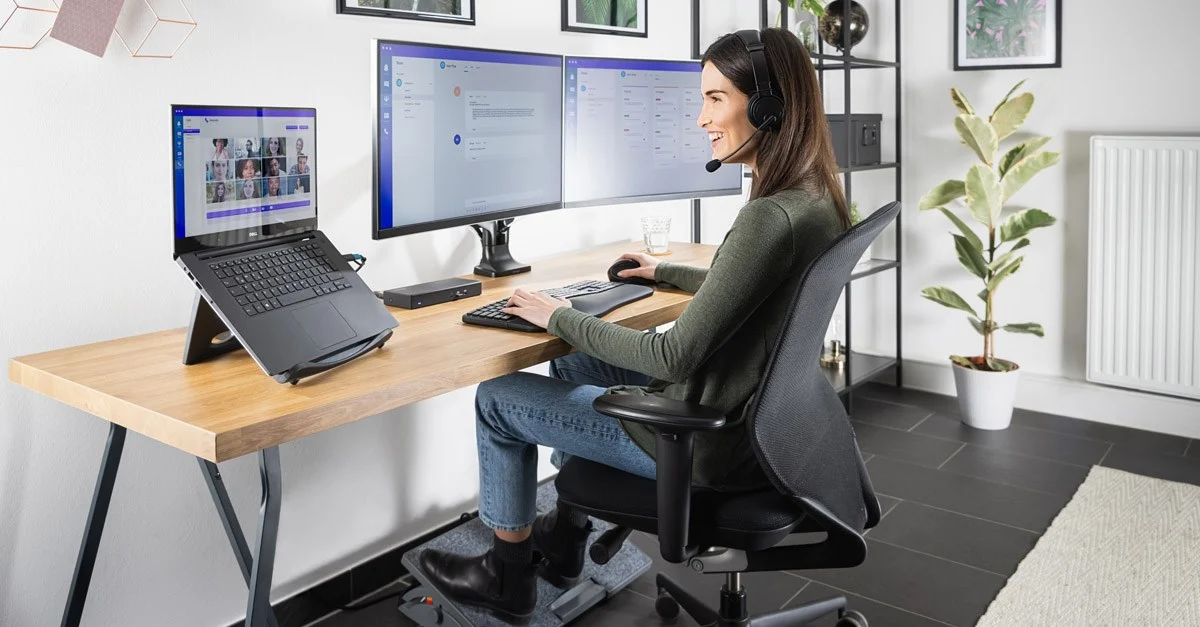
Try these adjustments:
• Sit with your back straight. Keep feet flat on the floor.
• Place your device slightly below eye level.
• Maintain proper lighting without reflections on the screen.
• Use an ergonomic chair for better posture.
• Take frequent breaks to stretch your neck and shoulders.
• If you use multiple screens, place them at similar height and distance.
These small corrections add comfort throughout the day.
Eye Care Habits for Better Vision
Routine eye care keeps your vision stable and reduces digital strain.
Practice these habits:
• Drink enough water to prevent dryness.
• Sleep well for complete visual recovery.
• Use preservative-free lubricating eye drops if prescribed.
• Eat foods rich in Vitamin A, C, E, Omega-3 fatty acids, and zinc.
• Include carrots, leafy greens, fish, nuts, and fruits in your meals.
• Wear computer glasses when advised.
• Get yearly eye checkups to track changes in vision.
Good eye care is a long-term investment. Your eyes support your work, creativity, and communication. Treat them well.
When Should You Visit an Eye Specialist
Do not wait for discomfort to grow. Medical consultation is important when:
• Symptoms persist despite lifestyle changes
• You have frequent headaches with blurred vision
• Vision becomes double or unstable
• You experience sensitivity to light
• You feel eye pain or persistent dryness
• You already use spectacles and need a power check
Early evaluation prevents complications and improves visual comfort.
Consultation Guide
Laxmi Eye Hospital is among the leading eye care chains in Mumbai with over 30 years of trusted service. With experienced eye specialists and transparent treatment practices, the hospital offers complete diagnostic and advanced eye care solutions across Panvel, Kharghar, Kamothe, and Dombivli. The institute is known for its reputed cataract surgical training programs like SICS and Phacoemulsification, along with fellowship training for ophthalmologists for more than 25 years. Services include Specs Removal LASIK, Cataract Surgery, Glaucoma care, Retina and Diabetic Eye treatment, Cornea Clinic, Eye Donation guidance, and Pediatric Ophthalmology, helping patients receive comprehensive care in one place. Appointments can be booked at any of their branches located in Dombivli, Kharghar, Panvel, and Kamothe.
FAQs
What is Computer Vision Syndrome
It refers to eye discomfort caused by long exposure to digital screens. Symptoms include dryness, blurred vision, and headaches.
How many hours of screen time is safe per day
Try to limit continuous screen use. Follow break routines. Balance work and rest for comfort.
Can blue light affect eye health
Extended exposure may reduce visual comfort and disturb sleep patterns. Using blue light filters or night mode helps.
Are eye drops helpful for screen dryness
Lubricating drops can reduce dryness when advised by a doctor.
Does screen distance matter
Yes. Keep the screen at arm’s length and slightly below eye level for comfort.
Can children get Computer Vision Syndrome
Children using screens for study or entertainment may also develop strain. Guided screen use and breaks help protect their eyes.
Do I need glasses for computer work
Computer glasses may be recommended after an eye checkup. Do not self-prescribe.
How often should I get my eyes tested
An annual eye exam is helpful, especially for those who use screens daily.
Healthy screen habits protect your eyes for years. A balanced routine, proper posture, and regular breaks keep vision comfortable. If symptoms persist or your work demands heavy screen use, consult an eye specialist for guidance and care. Your eyes deserve attention and care in a digital world.